
I am sure if you have used Mozilla Firefox long enough, you have came across situations where your Mozilla Firefox bookmarks were mysteriously missing. Most of the time this happens after a Firefox upgrade.
This is really a frustrating situation to be in, especially if you have lots of links and other information in the bookmarks just like what I have. But, as you might have expected, there is actually a way to restore the lost bookmarks, so read on. The following tips might save you days of headache. 🙂
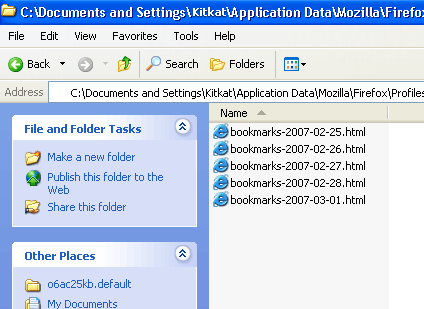
Actually the bookmarks are not lost since Firefox keeps all bookmarks and some other important information in the profile folder in Application Data (Usually this is located at C:\Documents and Settings\[user_name]\Application Data\Mozilla\Firefox\Profiles\).
For Firefox versions 1.5 and above, the browser automatically creates 5 most recent backups in the “bookmarkbackups” folder. The backups are named according to the date they are created, so you can easily identify which one is the latest version. Then, you can restore your bookmarks by simply deleting the “bookmarks.html” file and replacing it with a copy from the “bookmarkbackups” folder.
After the file is replaced, simply restart Firefox for it to take effect if it doesn’t already work. Simple and cool, isn’t it? 🙂