
If you ever had a question that goes like “Which filesystem is best for my USB drive?”, now you can have the answer. Intrepid geeks over at Test Freaks have made a massive benchmark of USB drives and how they performed when formatted with different filesystems. The short answer is: stick to FAT32.
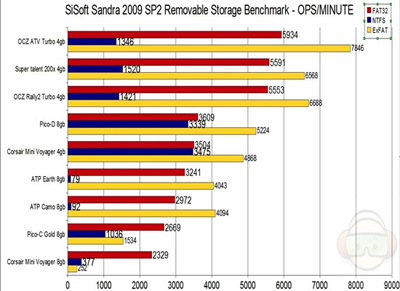
The defaults settings show that FAT32 is fast and compatible across all hardware, so there is little risk of anything going wrong such as going to a friend’s house and finding out his computer can’t read your flash drive. The three filesystems tested were FAT32, NTFS and Ex-FAT. While FAT32 and NTFS is the more recognizable of the two, Ex-FAT is a new filesystem which only Vista can currently access, unless you install the appropriate drivers on an XP machine before you can access it.
The benchmarks also show that there is a large variability between the capabilities of individual USB drives. This show that not all drives are created equal, and it’s best if you read up reviews before buying a pen drive to ensure you’re not getting a dud with lousy performance.
That said, Ex-FAT performed marginally better compared to FAT32, with NTFS being the worst filesystem to use on a USB drive. Of course, some readers have suggested that by turning on the Performance option rather than the Optimize for Save Removal option, the performance of NTFS increased significantly. But for most consumers, stick with the default.
So the next time you and your friend are having an argument over this question, point them over to this article. =).