Please subscribe to my feed.
I have decided to remove the Live Shoutbox which I told you in this post. Simple reason, I need to come to my blog in order to see your messages, and it’s not spam protected and thus there are many spam messages coming in already although I have only put it up for a couple of days.
Now, a better alternative is to put Windows Live Messager on my blog. Yes, you can chat with me on Windows Live Messenger (previously known as MSN Messenger) directly! Don’t wait, type your message in the box on the left column of this page… get in touch with me.
If you want to put this on your website or blog. It’s fairly easy. Login with your Windows Live ID at Windows Live. Windows Live ID can be your MSN Hotmail, MSN Messenger, or Passport account.
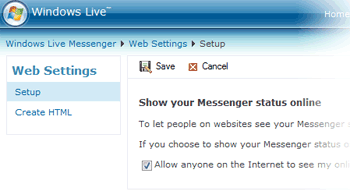
Check/enable the option “Allow anyone on the Internet to see my online status and send me messages”.
After that, click on the “Save” button at the top bar of the page to save the setting. Once that is done, click on the “Create HTML” link located at the left column of the page. Now, you have 2 options how to display your Windows Live status on your website/blog. Select either the status icon, or the web messenger control, depending on your own taste or preference. For me, I selected the web messenger control.

After that, simply copy and paste the generated HTML code in your website/blog template.
Now, all your web visitors can chat with you on your Windows Live Messenger. So convenient, easy, fast and most importantly FUN! I teach you a nice trick today, to return the favor, you come to my blog and date me, can or not? For pretty girls only. Terms and conditions apply.
MerDuriaN
November 10th, 2007 at 1:05 am
First time seeing blogger placing MSN Messenger to replace shoutbox!
Good idea
KennyP
November 10th, 2007 at 1:30 am
I teach you the trick at first, what favor do you return to me?
Kitkat
November 10th, 2007 at 2:36 am
MerDuriaN,
Come MSN with me!
KennyP,
You are the smartest of all the tech bloggers in Malaysia!
How to run multiple instances of Windows Live Messenger (MSN) - Kongtechnology.com
November 14th, 2007 at 5:35 pm
[...] am sure by now you have enjoyed to the max the excitement of putting a web messenger on your website or blog. Your visitors can now chat and interact with you directly. Your website or blog has become more [...]
Alfa romeo sacramento
March 9th, 2008 at 6:11 pm
First time seeing blogger placing MSN Messenger to replace shoutbox!
Good idea
mousa
May 29th, 2008 at 10:25 pm
i wanna some wedsite i can relogin the messenger from there i don’t wanna setup the messenger software in my computer
Joe
June 11th, 2008 at 3:38 am
Where is this settings? this is no where to be found, wanna go step by step?
Brendan Bubb
August 1st, 2008 at 3:50 am
When I paste it into my website, it just shows the text and nothing else. I am using Microsoft Publisher
Roxy
August 20th, 2008 at 9:42 pm
I tried to put on my client website, at first I missed something while configuring this, but now it is fine. Thanks for sharing
Best Wishes,
Roxy
Web Designer
thomas
August 27th, 2008 at 9:30 pm
hi
i have put it on my website i am useing joomla it worked fine with version 1 but my other sites are on version 1.5 any ideas why it wont work it say sever error
Brendan Bubb
September 27th, 2008 at 7:36 am
OK. I found out how to insert it on Microsoft Publisher. Its very simple. All you have to do is insert a HTML Code Fragment box and paste it into their.
AmSo
October 22nd, 2008 at 11:37 am
Thanks very much for the guide, it works!!
Miguel
November 27th, 2008 at 10:31 am
Hey, I have a problem with msn, let me explained you. I have a web site, and I am using the html code on my web site to chat with my customers and customers with me, before was working well with my msn in my mobile phone. I could chat with customers and they could chat with me (I have windows mobile 6.0 in my smart phone HP 510), now, it does not work. When I connect my PC works my customers who visit my web, can chat with me, but when I connect my mobile device, they can not chat or see me on line. Please some one who helps me, my msn aborigem@live.com.
Gianluca
December 1st, 2008 at 11:22 pm
Hi.
I am in a bit of a pickle. the Tech guy who created this page said that the msn messenger feature can be done in live messenger, hotmail…etc or am i wrong.
I want to have my msn messenger appear on my website, i need to the code for it, where would i find the code, in my messenger or can i access it in hotmail-its just everything to do with msn is blocked….
But, if theres sum1 kind, who could tell me step by step how to achieve this…YOU CAN POST HERE OR EMAIL me at gianluca1@hotmail.co.uk
many thanks…..
Dan Ben-Arye
December 4th, 2008 at 1:03 am
After placing the code in my site, the Messinger is offline and will not work.
Please assist.
Dan
JayTal Web Designs
January 17th, 2009 at 5:40 am
wow, hopefully this will turn more of my visitors into paying customers.
ive been wanting to do this for about 2 years, ive now found it. it was a piece of cake to setup, works with css positioning too.
love ur work, id kiss u if u were in arms reach
Pauloandes
April 29th, 2009 at 6:27 am
Hi, I’m trying to put it on a joomla site… but When I go to -> Content – Any -> “Edit HTML code” -> paste de code, and save … PUFF!, nothing happens…
Joomla deletes de HTML code I just pasted nad leaves as it was, you know why??? Thanx in advance…
Fabian
May 5th, 2009 at 9:53 am
Very usefulll the information, but i’ve used this aplications free and in the next week i went to my computeer, did sign in and play online, but in the web site i still appear offline. Do you know what is the problem?
Mark
May 16th, 2009 at 2:32 am
All I get on my site is this error message, My site is a Joomla site.
Server Error in ‘/Conversation’ Application.
——————————————————————————–
Runtime Error
Description: An application error occurred on the server. The current custom error settings for this application prevent the details of the application error from being viewed remotely (for security reasons). It could, however, be viewed by browsers running on the local server machine.
Details: To enable the details of this specific error message to be viewable on remote machines, please create a tag within a “web.config” configuration file located in the root directory of the current web application. This tag should then have its “mode” attribute set to “Off”.
Notes: The current error page you are seeing can be replaced by a custom error page by modifying the “defaultRedirect” attribute of the application’s configuration tag to point to a custom error page URL.
Any ideas guys?
Thanks
Alan Please assist
May 30th, 2009 at 8:51 am
After placing the code in my site, the Messenger is offline and will not work.
Please assist.
Alan
Exercise Programs
June 3rd, 2009 at 3:24 am
I just installed the latest Windows Live messenger on my computer. I had been using windows messenger that was already installed for a few hours beforehand. When i try to sign into Windows Live messenger, it says that the “Windows Live Communications Platform has encountered a problem, etc etc.” I’ve uninstalled and reinstalled windows live. Is there a way to fix this?
Anonymous
July 16th, 2009 at 6:50 am
kewl but don’t work with opera :/
Hencav
January 15th, 2010 at 8:59 am
Put messenger in ours sites is a fine way to get visitor coming back to site.
sskalist
January 21st, 2010 at 12:46 am
@mark
I had the same problem….
It’s because of the email cloackin…turn it of and you’ll be fine!
Nicky
January 21st, 2010 at 6:59 pm
After placing the code in my site, the Messinger is offline and will not work.
Please help
Templatetango.com
February 1st, 2010 at 5:00 pm
Hi many thanks for this gre8 idea
steve w
February 10th, 2010 at 5:52 am
Dude I’ve looked for days for how to do this – Thanks!
steve w
February 10th, 2010 at 4:22 pm
Any Idea how to stop it asking if I want to log in as me? I only want my customers to message me, not be able to sign in as me.
steve
wilson
February 15th, 2010 at 11:44 pm
question…. can you chage the laguage to be display in your website?
talking about the live messanger!!!!
regards
wilson
kirsty
March 20th, 2010 at 7:02 am
this was working brilliant for me… but has now stopped
i have noticed the “tick” box wont stay ticked as mentioned above & i think this is why its not working
can you please help??????????
baagdi
April 21st, 2010 at 12:55 am
wow this is easy. thanks
pling
April 24th, 2010 at 11:18 pm
Hi all,
I also have the same problem, it always showing offline this is because I didn’t press the save button on top of the check box. After I press save it immediately showing online. hope this help.
pling
Régis Amaral
May 2nd, 2010 at 5:24 am
Hello, I apologize for if my English is bad, is that I’m from Brazil.
I adapted the code provided in the configuration page of the messenger:
http://settings.messenger.live.com/applications/websettings.aspx
As you can see there are 3 types: window, button and icon.
But the main thing that should be of interest to people who program for the web are the link, image and language status of the conversation window:
1) Link to the Conversation window
XXXXXXXXXXXXXXX@apps.messenger.live.com & mkt = en”>
2) Image Status
3) Code of Client
Where XXXXXXXXXX will put the code of the user, each account from the MSN has its own code. That way you can insert into a database for example code msn user.
4) Translation of Chat Window
And at the end of the link part “mkt = en” sets the language of the conversation window in Portuguese of Brazil, the pattern as soon as you save the code is “mkt = en-US” (English)
But I need help solving a problem,
I have some clients with this scheme to work but others do not.
I configured each account to put them on the msn site, only some work, but others do not, always appear as offline.
Do not know why, it may be firewall?
If someone can give me a hint, please send them to
amaral.regis @ hotmail.com
Thanks!