
As ISPs scramble to block P2P access and throttle torrent connections, many are finding out the frustration of watching their download speeds slow to a crawl, fully realizing that their connections are capable of going so much faster! In the past, there are ways around this, such as using TorrentFlux to bypass the ISP throttle.

TorrentFlux is a type of account which works because ISPs cannot throttle direct downloads. That means there is only one open channel between you and a target computer to download files, whereas in P2P, you have hundreds of open channels downloading little bits of the file one by one and is easy to detect as P2P traffic and blocked accordingly. With TorrentFlux (and other similar services), you get a server to help you download the torrent files (the servers are on a guaranteed unfiltered Internet connection, probably overseas) and you simply connect to the server to retrieve your files once they’re done. However services such as these are not free, although there are a few community operated servers that charge a maintenance fee only.
However, the world has largely ignored IRC filesharing, which have been around since before even the LCD monitor. It’s an old technology that have been operating silently behind the scenes, and remains the preferred choice for ‘scene groups’ (pirating clubs, if you will) to exchange their content. This is a guide to teach you how to tap into this powerful source of content.

First off, you’ll need MIRC. Once installed, start up the software and the rest is pretty self explanatory. Now you need to connect to a server. For now, connect to the server irc.abjects.net. Once connected, join the room #mexicanmafia.
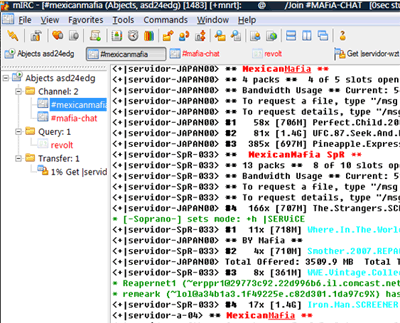
The output can be pretty bewildering at times, but bear with it. Read the first few lines as they provide clues to how to use the channel. In this case, it tells us to join #mafia-chat to search. So join that channel and you will discover the command !search, which we can use to search for content. So type in !search (something to find) and the channel will respond with matching queries.
It’s important at this stage to set up your MIRC’s download capabilities as they are disabled by default. Go to Tools, Options, and at the left hand side choose DCC. At the On Send Request, tick auto-get file. Then mouse over to Options and tick Passive DCC. Finally, go to Ignore and in the Method drop-down box, choose Disabled. You’re set. 🙂

Now go back to #mexicanmafia and with the download link you get, paste it here and with any luck, a bot will respond to the request and automatically start sending the file to you. Simple as that!
Finally, once you are comfortable to this world, you can check out a few great IRC search websites such as XDCCing, among others. This website will allow you to search the entire IRC universe to look for content, and from there you can connect to the particular server and chatroom to access the goodies within.
I wish you a wonderful time in exploring this great resource for getting files that are too darned slow to get in P2P networks such as BitTorrent due to traffic throttling by your ISP.