
We’re all used to it. Our parents, non-tech savvy friends, (some) girls, your kids. These are the people who often cry out for help when something is not quite right with their computers or when they hit a hurdle and they have absolutely no idea what just happened. Instead of Google-ing for the solution online or calling a technician, they normally call you – the only person who can help them.
For me, this is happens quite often. I usually try my best to help everyone I can, but sometimes there’s just so much you can do for someone over the phone or through instant messaging. At those time, I either tell them that I should view the problem in person or if they’re too far away then I can’t do anything for them, unfortunately. There are some solutions to remotely access their computer, but can you imagine trying to ask your parents to set up Remote Desktop and open the related ports of their router? I’d rather throw they the laptop against the wall.
Luckily for Mac users, there’s a simple solution.
I use Schnitz Remote Lite to access other Macs in trouble. It’s insanely easy to set up compared to other remote access services which I’ve ever used. The reason for that is because the connection is reversed. Let me explain.
Normally the technician initiates a remote connection to the computer he’s trying to rescue. Hence, the computer being rescued has to have several criteria in order before a connection can be established:
- Ports forwarded to the computer
- Remote Desktop/VNC software with proper settings
- Firewall disabled or exceptions allowed for the remote access software
Using Schnitz, all this is in reverse. The computer being rescued is the one initiating the connection. So all the work of setting up port forwarding and firewall exemption is done by the technician. Easy peasy.
Here’s how it works. Imagine a scenario when your mum calls you for help on her Mac.
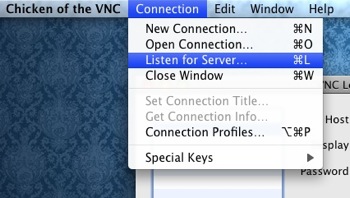
Preparatory set-up on the technician’s side is getting hold of a VNC application. I highly recommend Chicken of the VNC, it’s free and you can get it here. Next, make sure that in your router, the port 5500 is forwarded to your computer. Turn off your firewall (mine is always off anyway). Finally, know your IP. The easiest way for me is to go to http://whatismyip.com and write it down. Now all you have to do is turn on ‘Listen for Server’ in your VNC application and you’re all prepped.
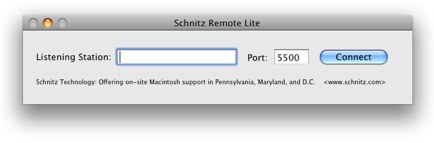
Now to deal with your mum’s problems. Get her to download Schnitz Remote Lite from Schnitz Technology. Once the ZIP is extracted, open the application. The interface is very simple. Simply fill in the Listening Station with your IP address and press Connect. That’s it.
Now, you’re able to remotely administer her Mac and find out the cause of her despair. After you’ve fixed everything, just close the connection. There’s nothing else to worry about.
I find this method the easiest solution by far to help someone with a Mac problem. Of course, the natural argument is that not everyone owns a Mac. But they should.
How do you help other on Windows? Is it just as frustrating? Share in the comments.