
I have a huge music collection, somewhere in the order of 60GB worth of stuff most of which I don’t really listen to, but would like to keep around all the same because there’s nothing like telling your friends that you have enough mp3s to last you 25 days of continuous play without having a repeated track.
But in the process of ripping my music CD and converting stuff around, a lot of my music collection are recognizable only by their filenames. They are not properly tagged, meaning the file doesn’t have any artist or album information or any sort of identification whatsoever, other than the filename. This presents a problem to most modern music library management tools such as iTunes, which relies heavily on the tags for most of its features including Genius Playlist, album cover downloads, etc.
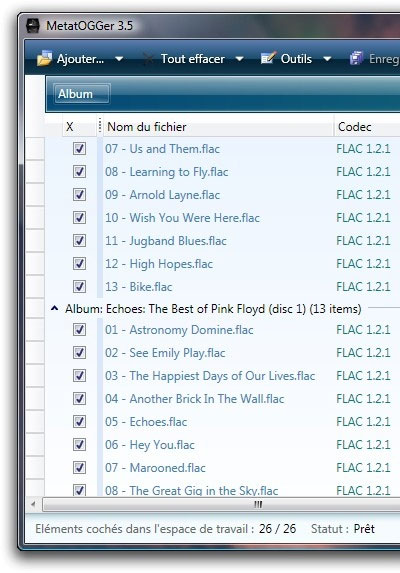
I have therefore searched almost in vain to find a software that would automatically tag my music collection without having me to interfere with it. There are lots of paid services out there which are no doubt useful for this kind of job, but I want something that is free, being the cheapskate I am, I found something called MetatOGGer. Not a really classy name, but for the price, it offers an unbeatable song ID service.
Acoustic fingerprinting identification
MetatOGGer starts up just like any other windows application. Its a little bit klunky to use, but the gist of the matter is that you simply drag and drop any sort of music into it (you can do this even directly from iTunes) and it will load up the music. After that, simply go to Tools, then Identify Song by Acoustic Fingerprint. Via the magic of the Internet (and some nifty programming no doubt), it will acoustically fingerprint your music (how, I don’t know. I guess it generates some sort of hash for the file) which it then uploads to MetatOGGer’s server. The server contains millions of these musical fingerprints, matched with the proper album and artist information. Once the server reports a match, the results are delivered back to your PC where it will automatically populate that song’s tags, all automatically!
Granted, some flaws remain. First, it relies on having a good database of fingerprints to compare to. I don’t know how MetatOGGer maintains its database, but from my fooling around, it seems pretty good, being able to pick up Japanese and Chinese songs with ease and also correctly identifying some of the more esoteric music that I have in my collection, including the tons of Cafe Del Mar stuff I have. It is a truly wonderful view to see this program churning in the background and turning your Unknown Album/Unknown Artist into a properly formatted song. With this information, iTunes can then be used to import in the correct album artwork and you are golden!
One flaw of the program is that it lags a bit, especially when processing large libraries. I have tried with 1000 songs and it’s pretty slow, although I left it on for the night to crunch through the data. I don’t recommend adding more than 500 songs at one go, especially if you have an older computer. The lag issue aside, it’s pretty solid and didn’t crash on me despite the amount of data I threw at it. I would recommend this app to anybody sick of seeing improper tag in their music collection. It also has some other miscellaneous tagging functions, but the star here is definitely the free acoustic fingerprinting identification.