Please subscribe to my feed.
Windows users should consider checking out this very useful utility; Ultimate Windows Tweaker. With over 150 options to change, it is indeed ultimate when it comes to tweaking Windows.
The tool works well for Vista and the latest Windows 7 RC1 for both 32 and 64 bit versions. Prior versions of Windows are not supported. No doubt RC1 have introduced some new features such as dragging windows to the edge to make it fill up half the screen (useful for widescreen monitors) and shaking an open window to return to desktop.
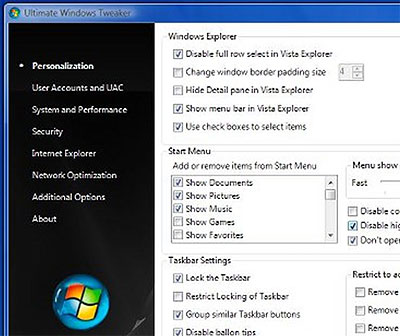
For some people who are annoyed by this, Ultimate Windows Tweaker allows you to turn it off. Customization options are split into 7 distinct categories, which are Personalization, UAC, System & Performance, Security, Internet Explorer, Network Optimization and Additional Options.
The list of tweaks cover stuff like turning on check boxes to select files, restore folders at startup, show drive letters (or hide them), disable balloon tips, enable/disable UAC, force DLLs to unload from memory when not in use, turning off autoexec.bat file (viruses love this) and a host of other options too lengthy to list out here.
Most, if not all, of the changes can be achieved via editing keys in the registry, but Ultimate Windows Tweaker collects all these little tricks into a cohesive, easy to execute program which is also portable and can be carried around in a pendrive where-ever you go.

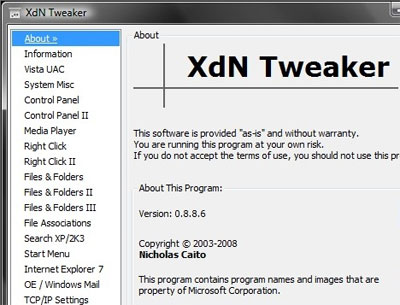
If you are looking for alternatives, consider checking out XdN Tweaker, which is not as fully feature rich as UWT, but does the job pretty well too.
Happy tweaking Windows!
Money4Invest
May 28th, 2009 at 2:32 pm
Thanks for the intro. I’m going to use it when I change my operating system. As of now, my OS is XP and I’m thinking to change it to Windows 7 in the future.
Keyword Service
May 29th, 2009 at 2:49 am
I have used a similar tool back on Windows 98. It was very handy to be able to change so many extra features of Windows. I should find a good tool like this for XP since I never made the upgrade to Vista.
imDavidLee
May 29th, 2009 at 9:55 pm
i still blur about this..but i will try it
Kitkat
May 30th, 2009 at 1:21 am
Money4Invest & Keyword Service, ya, you can skip Vista and use Windows 7 once it’s finalized.
As for now, you can speed up your OS with this tool.
imDavidLee, it’s nothing to blur about. If you’re blur, you can try Ultimate Windows Tweaker since it is much user friendly.
POS Systems
June 5th, 2009 at 6:19 pm
I think i want to change xp to window 7 and will try ultimate windows tweaker. Thanks for information.
mytheory
June 6th, 2009 at 12:02 pm
ah… it’s for vista..
i dont use vista.. it slow down my pc
MSFT_GlenF
June 9th, 2009 at 10:24 pm
You should check out the Windows 7 forum, at microsoft.com/springboard. It provides support, “how to” video guides and the several other tips and tricks to make your Windows 7 experience awesome.
Thanks
Glen
PS3
October 24th, 2009 at 1:16 am
i do already have a program that helps me twek the system. and the functionality’s great. so, shall i really try this one too?
pays to live green
March 17th, 2010 at 5:52 am
That’s a nice little tool by make Windows a little less crappy. It’s probably best that they make a tool since it’s never good to mess around with registry keys unless you know what you are doing.
Cure Blackheads
July 22nd, 2011 at 6:00 pm
I think i want to change xp to window 7 and will try ultimate windows tweaker. Thanks for information.