
Have you ever heard of a Chumby? No? Me too. Until today that is.

A Chumby is a small little Linux computer built into a cushion. Yes, that’s what it looks like. Chumby is made to provide its users with Internet and LAN access via a Wi-Fi connection. It is actually a small touch screen inside a bean bag. If it’s not for the screen, it might even look like a bean ball. It also functions as an alarm clock to wake you up in the morning. And it does look like an alarm clock.
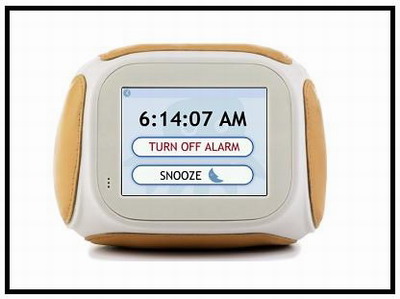
The Chumby Alarm Clock
Chumby has a 3.5 inch touch screen. Even though it is small, the screen is bright enough for easy reading. And then at the back of the Chumby, you can find the USB ports, the power jack, earphone jack and the on/off button.
The main feature of Chumby (other than it is a cute and cuddly mini computer) is the widgets that you can program into the Chumby. These widgets are the little applications that you set into your Chumby to do the things that you want it to do. It is kind of like Facebook and it’s applications.
There are 3 ways you can get those widgets into your Chumby; you can either ‘chumby’ it off your friends, program it yourself or download from the 500++ in 29 categories Chumby widgets available on its official website.
To use it, you can just plug in your Chumby, connect to your wireless network and then choose from your list of widgets, what you would like to do with it. There are many kinds of fun and interesting widgets to choose for your Chumby, ranging from news to games, and from videos to stock quotes.

Rear a dog inside your Chumby !!!
You can even play your iPod with your Chumby. All you have to do is to connect your Chumby and your iPod using the iPod charge or sync cable and then choose the music player widget from the Chumby to play your music.
The Chumby is currently selling for about $180 on its website, in the US but I wonder if I can get it in Malaysia.
Chumby Specs:
• 3.5″ LCD color touchscreen
• Two external USB 2.0 full-speed ports
• 350 MHz ARM processor
• 64 MB SDRAM
• 64 MB NAND flash ROM
• Stereo 2W speakers
• Headphone output
• Squeeze sensor
• Accelerometer (motion sensor)
• Leather casing
• AC adapter included
• Wi-fi connectivity
• Access to the free Chumby Network
• Over-the-air software updates
From here

What it can do:
• Catch the latest news headlines, sports, weather, stock prices.
• Play iPod® mp3 and m4a files through built in speakers. Charge it too. (Not currently compatible with Apple iPhone, iPod Touch or 6th generation iPods.)
• Enjoy your Flickr and Facebook photos as a digital picture frame.
• Stay updated on new Netflix releases or view your movie queue.
• Make and share e-greetings, photo mash-ups, goofy animations.
• Wake up to the multi-tone alarm clock.
• Track any eBay auction or Craigslist items.
• Monitor incoming email on any POP3 account.
From here

The little Chumby in your life