
Let me show you the steps involved if you need to transfer a domain name out of GoDaddy. Admit this, GoDaddy is one of the largest domain name registrars in the world, but it isn’t the cheapest when you come to pricing. For example, it doesn’t offer private whois information feature for free, you will need to pay up to about US$9 for this feature. So, there are situations when you might want to just transfer your domain name out of GoDaddy.
First, of course login to GoDaddy’s account and go to the Domain Manager.

Select on the domain name which you wish to transfer out. Then, click on the “Locked (Change)” link to unlock the domain name, if it’s locked. Locking prevents unauthorized changes to a domain. It also prevents the domain from being transfered to another registrar.
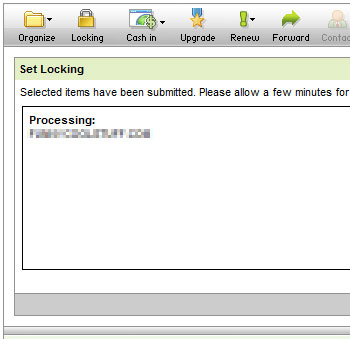
Once the unlock request is submitted, it will usually take 1 or 2 minutes to process. After this is done, you will need to turn off the private whois feature. Click on the link “Privacy : On (Manage)” link to do this. On GoDaddy, the private whois feature is managed by DomainsByProxy.com and so you will be redirected to this website.

Simply follow the on screen instructions to turn off this feature for the domain which you wish to transfer out of GoDaddy. This should only take a few minutes, after it’s done… don’t expect the system to return you to GoDaddy. Weird, it just didn’t redirect back, perhaps the two systems’ integration has still got some holes to patch up.
Go back to GoDaddy and login again. You should see that the domain is now unlocked and not private whois protected. Good, now click on the link “Authorization Code: Send by Email” to request GoDaddy to email you the authorization code (aka Transfer Secret).
Wait for a few moments for you authorization code to arrive, but in the meantime, you can go to the incoming registrar (aka gaining registrar) to initiate a transfer request. In this case I will use DirectI.
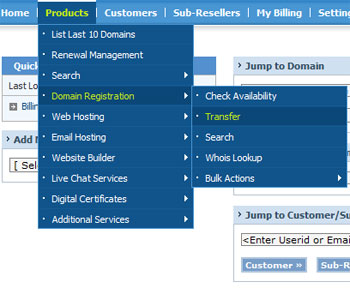
Login to DirectI, and navigate to Products > Domain Registration > Transfer.
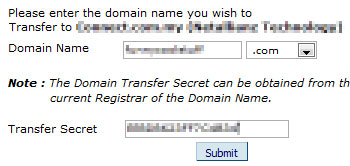
A new screen comes up. Enter the domain name you wish to transfer. Of course, enter also the authorization code which you should have received in your email now. Transfer secret is a domain transfer code (password) granted by all the domain name registrars and is used as a protection mechanism, to ensure that only the rightful domain owner can control the transfer of the domain registration.
Shortly after this step is executed, you will get an email from DirectI, requesting you as the rightful owner of the domain name to approve the transfer request. If you wish to proceed, click on the approve transfer link.

Think twice before you click on the approve link. Once you have clicked on that… the transfer will be carried out and it will take up to 5 days to complete. Once the domain is transfered to DirectI, its expiry period will be extended by one year.
Hope today everyone learned something new. 🙂