
I need a little help from you tech geeks! My friend showed me his network configurations. I don’t have physical access to his computer and modem because he’s staying in Nilai and I am in KL. But his network is something like the following.
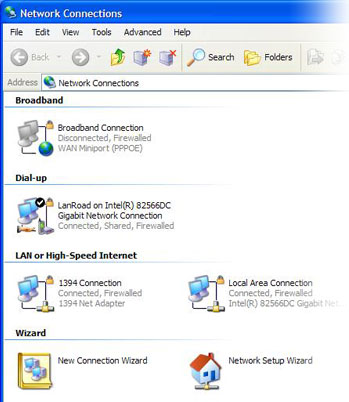
From my understanding, the 1394 Connection in Windows Network Connections should be a FireWire connection which can be ignored. He is actually connected to a Streamyx modem, using DHCP configurations.
His ipconfig shows the following.
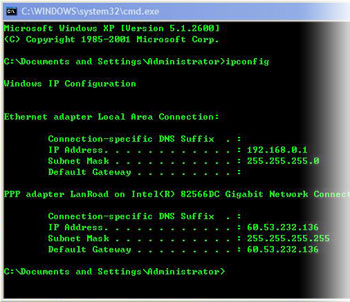
Looks like he is using the default network range: 192.168.0.1. No default gateway.
I am not familiar with this setup. You have any idea what’s the “PPP adapter LanRoad” thingy? What IP is it holding 60.53.232.136?
Now, what he wants to do is to setup a small home network so that he can hook up more computers to the same network, and get on the Internet. He has bought a router to do that… a good move. But you have any idea how he can connect up all the pieces (the new router, the existing Streamyx modem, and his computers) to form a LAN which he can use to play network games? Of course the LAN needs to connect to the Internet via the modem.
Any tips will be greatly appreciated.